An assistant. On your PC.
Ask how to use the app or query your championship data. The AI assistant runs locally, without sending your questions to a cloud AI service.
Local AI · Ollama
Passion meets organisation
From the first draw to the final point.
The tournament manager for Italian billiards and boccette, built for the people who keep the whole night moving.
Free · Windows 10 / 11 · No subscription
From draw to podiumEvery phase, in one place.
At home. At the club. Even offline.Your championship travels with you.
Your PC, your dataLocal database and AI assistant.
01 Complete control
Entries, brackets, last-minute messages. Finally, a workspace built around the pace of a heat-based championship.
Heats of 4 or 8, singles or pairs. Draws with rules, venues and availability. Call-up slips ready to print or send.
Roll call, delays, scores and qualifications. Follow match night without losing the thread, all the way to the final phase.
Season standings, statistics and hall of fame. Every result has its place, even after the championship is over.
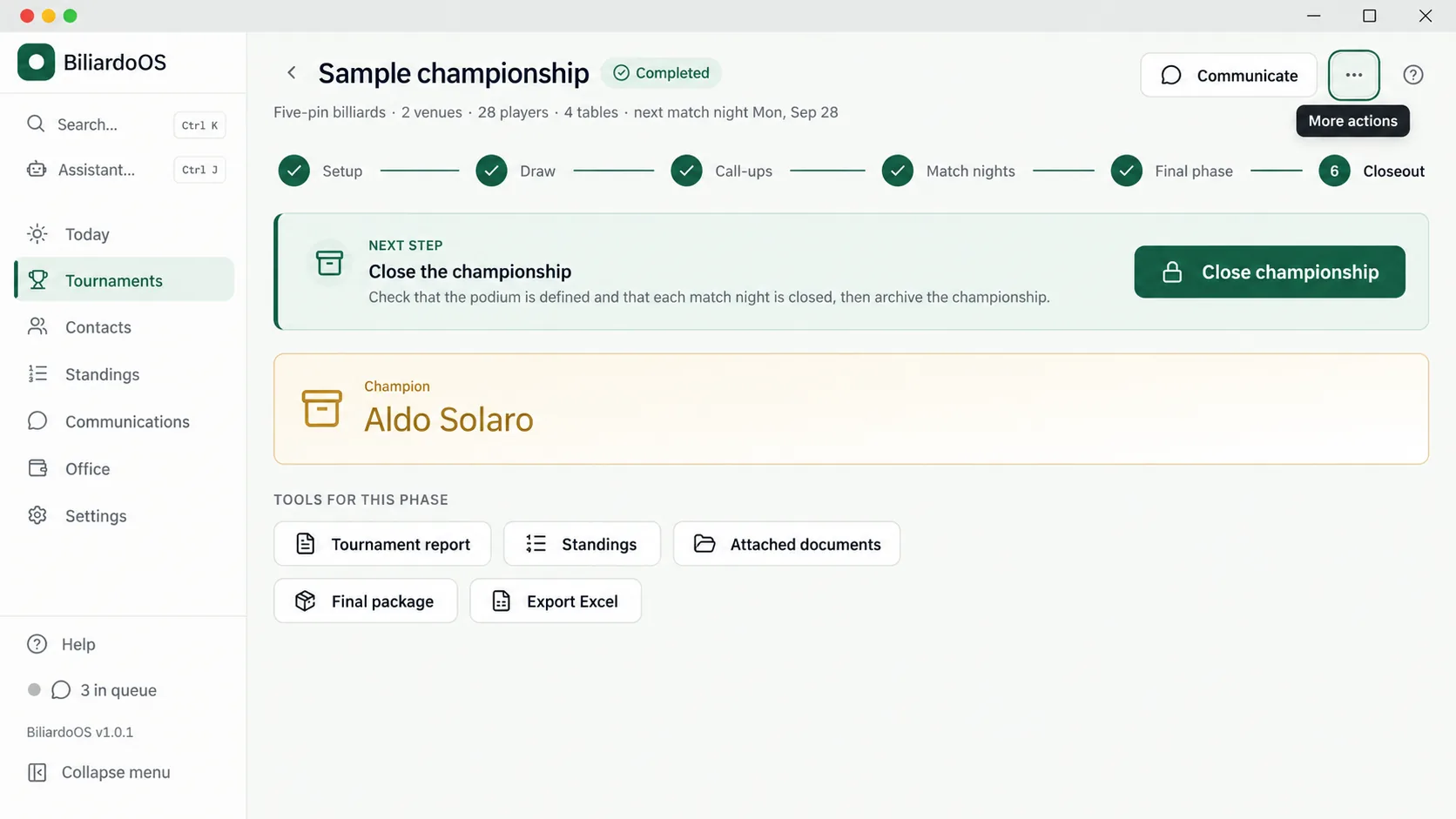
From setup to closeout: every championship phase, the next step and the tools you need, all in one view.
The room. The people. The passion.02 The soul is still the club
The best part is not managing a spreadsheet. It is opening the room, seeing familiar faces and hearing the first shot on the cloth.
BiliardoOS puts everything behind the scenes in order, so the organiser can be present where it matters.
Bring it to your club03 Quiet technology. Practical help.
Help when you need it. Control where it belongs: in your hands.
Ask how to use the app or query your championship data. The AI assistant runs locally, without sending your questions to a cloud AI service.
Local AI · OllamaCall-ups and communications via WhatsApp or email. Scheduled sends, queue status and quiet hours: you know what goes out and when.
WhatsApp · Email · PDFLocal database, backups and app lock. Connect your home PC and laptop when needed, or run match night offline.
Backup · Home / laptopInternet is required for downloads, updates and any communication or sync services you enable. Day-to-day tournament work can remain offline.
04 Your next match night starts here
No BiliardoOS account to create.
No subscription. Just your next championship.
Windows 10 / 11 · 64 bit
Download freeBase version, free to download and use.
On another device? BiliardoOS installs on your Windows PC.
The button opens the latest version published in the project repository.
Open BiliardoOS-Setup and follow the guided setup on first launch.
Add venues and players. The guide and assistant are already inside the app.
Does Windows show an installation warning? Read the SmartScreen guidance first.
Before you start
For everything else, there is a community
to talk to.
The Base version of BiliardoOS is free to download and use, with no software subscription. It is not open source: all rights are reserved. Full terms are in the project licence.
For amateur Italian billiards and boccette championships between bars, clubs and associations: heats of 4 or 8 players, singles or pairs, followed by a final phase. The draw respects configured rules such as venues, availability and seeded players.
Yes, for day-to-day work: draws, printed call-ups, roll call, results and standings. Internet is needed to download the app and AI model, receive updates and use online features such as WhatsApp and email sending.
The championship database and AI assistant live on your PC. Local AI uses Ollama and requires an initial model download selected for your hardware. Communications and sync options, when enabled, use their respective external services.
The desktop app is available for 64-bit Windows 10 and 11. A phone can be used for dedicated result-entry features through the local connection configured from the PC. It is not a native Android, iPhone or macOS app.
The current installer is not digitally signed, so Windows may display a SmartScreen warning. Download only from the project repository releases and scan the file with Windows Security before proceeding. A warning alone does not prove a file is safe or unsafe: if you are unsure of its source, do not run it.
More details are available in the installation instructions.
The app checks for new versions at startup; you can also check from Settings → Updates. Updates are preceded by a backup and are not installed during an active match night. For questions, use Discussions; to report a problem, open a GitHub issue. The software is provided without warranties, according to the licence.